Project manager
The whole renovation, in one place
Rooms, the materials each one needs, the tasks against them, and the gap between what you estimated and what it actually cost. The budget assembles itself out of the work you were doing anyway.
Free to try — no sign-up, nothing to install. How to price a job →
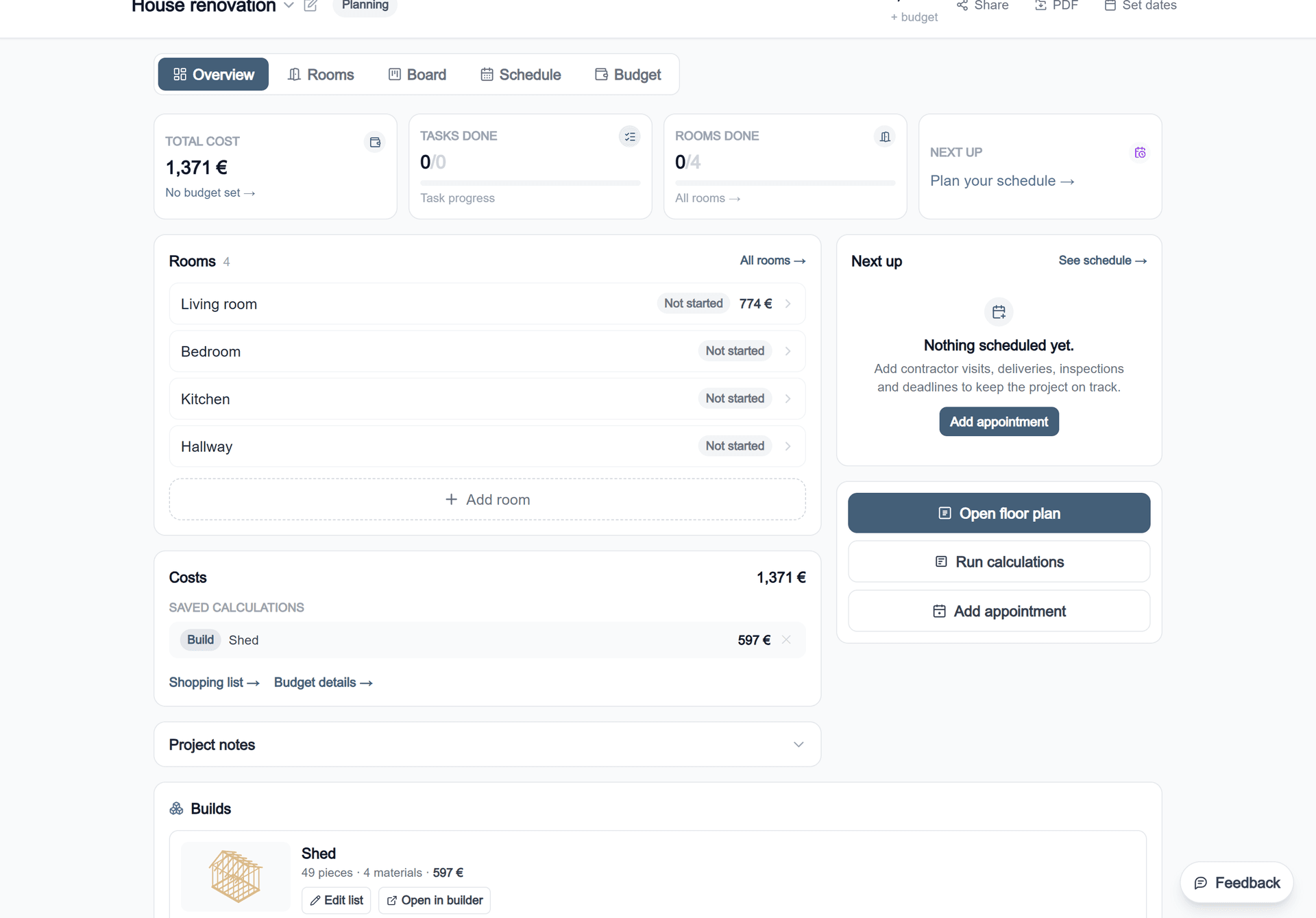
The measurements do the work, not you
Plenty of things track what a renovation costs once you have the numbers. Getting the numbers is the hard part — and getting them again every time the scope moves.
Here a room is drawn once. Its floor area, wall area and perimeter go into every calculation saved against it; those calculations total into the room; the rooms total into the project; and the project is what you hold against the invoices. Change the room and the chain re-runs. Nothing is retyped, so nothing drifts.
What a project holds
| Rooms | Each with its own status, cost and the calculations saved to it. Cutting a room from the job is one action and the total follows. |
| Saved calculations | Any calculator result, kept with the numbers that produced it so it can be reopened and changed rather than redone. |
| Budget and actual | An estimate per room and a project budget, with expenses logged as invoices arrive and the variance shown where it happened. |
| Tasks and hours | Estimated against actual hours, which is where labour — 60–70% of most renovations — gets a number. |
| Schedule | Contractor visits, deliveries and inspections, so the sequence is visible rather than remembered. |
| Photos and notes | Attached to the room they belong to, on a paid plan. |
| Builds | Anything made in the 3D builder, with its cut list and cost, attached to the project. |
| Shopping list and PDF | One list across every room, and an export to take to a merchant or send to a trade. |
Where to start
What is free
One project with three saved calculations, free, and it stays in your own browser — nothing is uploaded unless you make an account. More projects, unlimited calculations, photos, PDF export and syncing across devices need a paid plan.
More on projects
Guides for the trades in the job
A project is made of trades. These are the methods behind the numbers it totals up.
Common questions
What does the project manager do?
It holds a renovation as one thing: rooms, the materials each room needs, the tasks and hours against them, appointments and deliveries, and the running total of what has been estimated versus what has actually been spent. Every calculation you run can be saved into it, so the budget assembles itself as you plan.
Can I track budget against actual spend?
Yes. Each room carries its estimate from the calculations saved to it, and expenses are logged against the project as invoices arrive. The difference is shown per room and for the project, so an overrun shows up where it happened rather than at the end.
Does it connect to the floor plan?
Yes, and that is the point of it. A room drawn in the planner carries its floor area, wall area and perimeter into every calculation saved against that room, so the project total descends from measurements rather than from numbers typed in twice.
Is the project manager free?
One project with three saved calculations is free. More projects, unlimited calculations, photos, PDF export and syncing between devices need a paid plan. Everything stays in your own browser until you choose an account.
Can I share a project with a builder?
Yes. A project can be shared as a read-only link, and exported as a PDF on a paid plan — which is the form most people want when they are collecting quotes, because it puts the quantities in front of every trade pricing the job.
Start with one room and one calculation. The project is built out of those.
What it costs. A free account holds one project with three saved calculations. Everything calculates on screen either way — the caps are on keeping and exporting the work, not on doing it. The Project Pass is one payment for three months of the rest, with no subscription.
See what each plan includes